OpenClaw 2026.9.5 reloads plugins without stopping the Gateway and shares conversations read-only
Installing, reloading, updating, or removing a plugin no longer takes the whole installation offline. Session Share hands a chosen group of conversations to a teammate on another paired installation as text they can read but not continue. Updates now validate the next version against a private copy of the setup while the current Gateway keeps running. The conversation database changes in this release even with archiving switched off, so a verified backup before upgrading is the only way back.
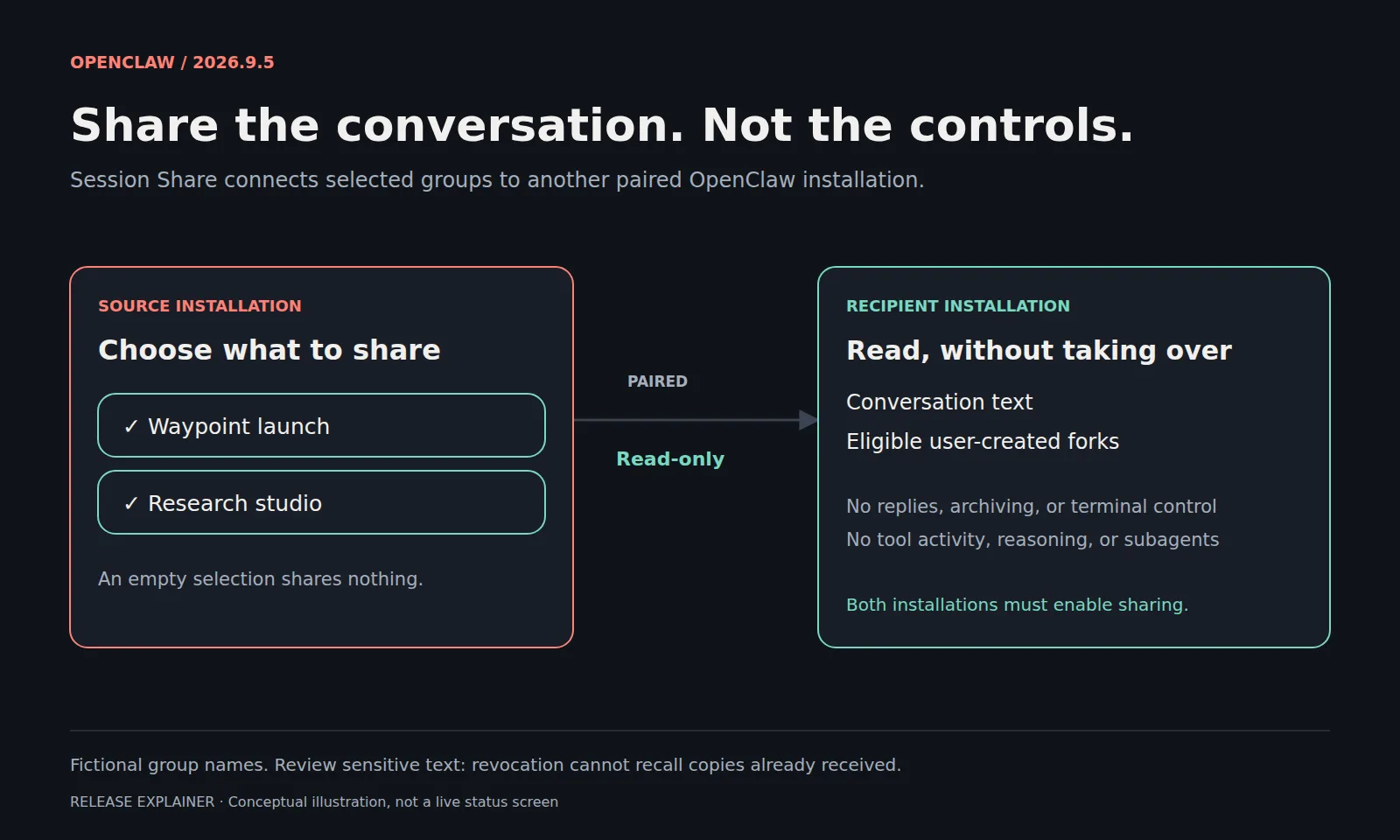
OpenClaw published version 2026.9.5 on September 19, 2026, with 4,179 pull requests and 64 direct commits behind it. Most of that is invisible from the outside. Four changes are not: plugins that load without taking the installation offline, read-only sharing of selected conversations, a browser page the owner and the agent use together, and an update procedure that tests the next version before it switches to it.
Plugins load without taking the Gateway down
Installing or reloading a supported plugin no longer requires a Gateway restart, so adding an integration or trying something out does not put the whole installation offline. The owner does it from the command line or through an authorized chat command, and the Plugins interface lists official and ClawHub packages. Existing permission checks and consent still apply.
The command line also accepts several plugins in one enable, disable, reload, update, or uninstall. Earlier successful changes stay in place when a later one fails, so the result has to be read before retrying. If a plugin replacement times out, recovery waits up to 60 seconds for unfinished work, restores the previous plugin, and restarts eligible channels. A failed cleanup can still call for another reload or a Gateway restart.
Two ways to work beside someone else
Session Share gives teammates on another paired installation read-only access to conversation groups the owner selects. They see the conversation text and eligible forks a user created, and they do not see subagents, tool activity, or reasoning. They cannot continue the conversation, archive it, or use its terminal. Sharing has to be enabled on both sides, and an empty group selection shares nothing.
The warning attached to it is blunt. Text and metadata may contain private information, and revoking access cannot recall what someone has already received. The source node has to stay connected, and cold history has to be restored on the source before it can be read from the other side.
A shared Browser dashboard is the other half of the same idea, pointed at the agent rather than at a colleague. Owner and agent work on one page: change a filter or leave a note, then ask the agent to continue from the state that was left. It runs in a local browser profile OpenClaw manages, with that profile's sign-ins rather than the cookies on a phone or laptop, and remote profiles, paired-node browsers, and attached personal browsers are unsupported. Stop closes the tab and loses unsaved page state; Resume reopens the saved address.
GPT Live in meetings and phone calls
GPT Live can now answer out loud in supported Meet, Teams, and Zoom meetings and during phone calls, and consult the OpenClaw agent while it does. It has to be selected explicitly in those places. In Talk, sessions without a pinned model choose Live using the configured OpenAI access, while existing model pins stay where they are.
Live is audio-only, so anything that needs a camera has to use the realtime model instead. Configured Platform credentials take precedence over ChatGPT subscription access and bill through the Platform route. Meetings require both the Gateway and the paired node to be updated, and a custom audio input command has to be removed before Live is selected. Live does not support Voice Call custom functions, or host-controlled wake-name and forced-consult modes.
Updates test the next version before switching
On supported paths, an update validates the next version against a private copy of the setup while the current Gateway keeps running, then switches over and verifies the result. If something goes wrong, recovery can restore the previous version, but only while the data and configuration are still compatible.
Two warnings sit beside that, and both matter more than the feature does. The private validation copy is not a backup. And rolling the application back cannot undo database migrations: this release changes the conversation database even with archiving switched off, so returning to the previous version needs the matching older build and a backup made beforehand. Conversation archiving itself is off by default; turning it on compresses inactive history after 30 days, and that interval can be changed without a restart.
Automation gets one specific change. When an update inside a managed Gateway service hands work to a background helper, the initiating command exits with 75, which means accepted and still in progress. A script that reads any nonzero exit as failure will now retry an update that is already running, so the documented step is to read the update status and follow the printed health guidance instead.
„You can install or reload supported plugins without restarting the Gateway.“
Sources
Related
Claude Code 2.1.278 moved auto mode's safety checks to the server, where they are not billed
In auto mode a classifier inspects shell commands and network requests before they run, and those checks were separate model requests charged as token usage. From this version Claude Code asks the server to perform them inside the session's own requests, and does not charge for them when the server answers. The default covers Enterprise plans, Claude API accounts, and the AWS, Bedrock, Agent Platform, and Foundry paths, subject to each platform's rollout. Where the server's checks cannot reach a session, the earlier billing returns and a one-time notice says so.
Claude Codeverified
GitHub is retiring six Copilot models and has rebuilt the code review overview
Six models stop working across every Copilot surface on October 19, 2026, and each one has a named replacement. On Enterprise and Business the replacement enables itself unless an administrator has turned it off, so the remaining work sits in configuration that names a model in writing. Separately, Copilot code review reached general availability. Its overview comment now separates open findings from resolved ones and from issues it missed on an earlier pass, and every finding carries a title.
GitHub Changelogverified
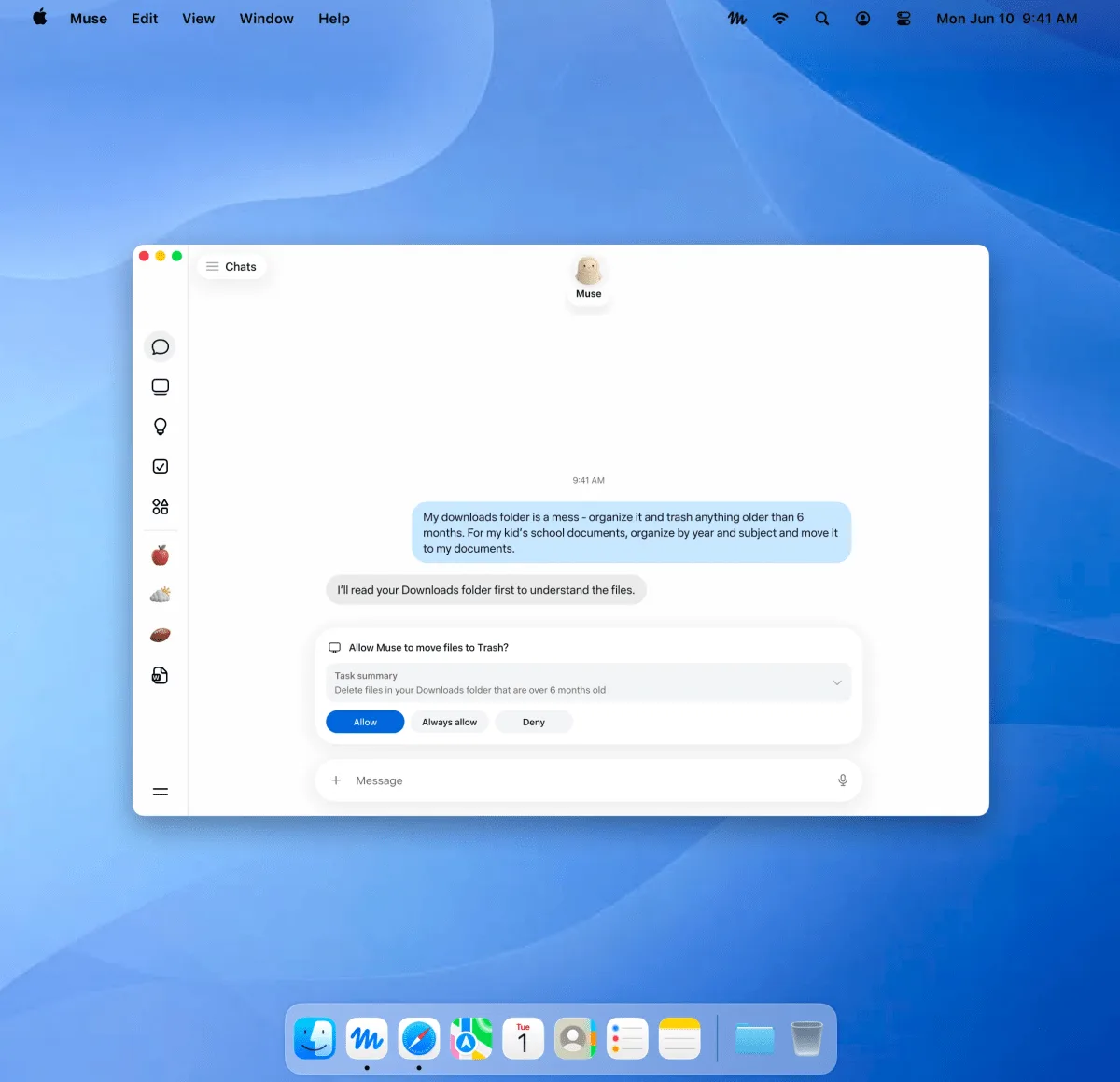
Meta's Muse reached the Mac, where the agent acts inside your own files and apps
Meta announced Muse on September 8, 2026 as a personal agent that does things rather than answers questions, and named iOS, Android and the web, with AI glasses still to come. The Mac app arrived nine days later, announced by Alexandr Wang on X rather than through the company newsroom. The difference is not only the platform. Until now Muse worked inside a virtual machine Meta runs, watched by a second agent that has to approve anything leaving for the internet; the Mac app works in files, apps and browser tabs on a machine Meta does not run.
Metaverified