Claude Enterprise now builds reports from a sample of a team's sessions and adds shared group budgets
Anthropic made three admin tools generally available for Claude Enterprise. Smart reports have Claude read a sample of a team's transcripts and show what the work cost. Pooled budgets give a group one monthly amount, and in-app surveys collect members' views.
Source
Smart reports, surveys, and pooled group budgets for Claude EnterpriseClaude Blog · Original published October 28, 2026
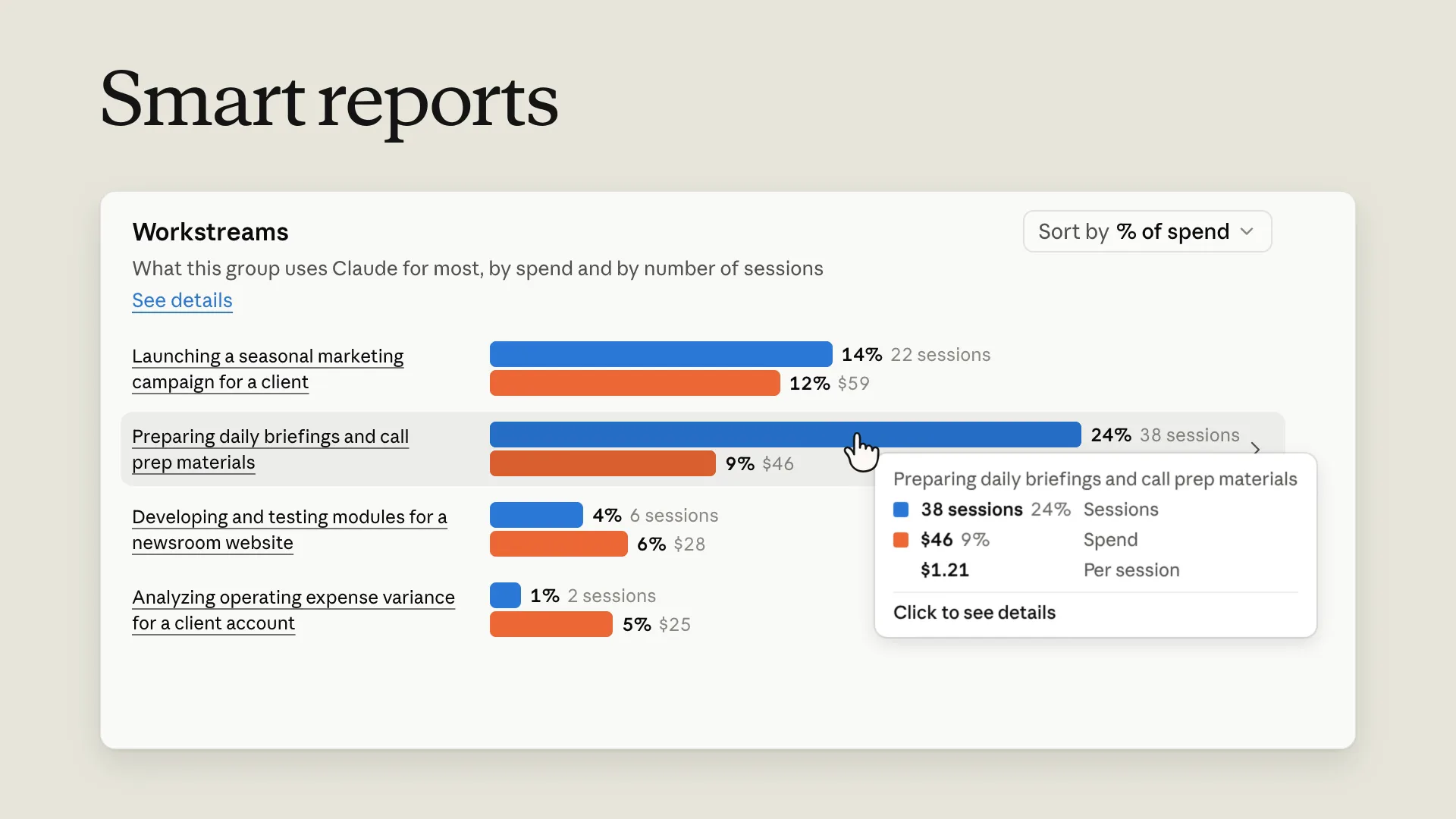
Anthropic announced on October 28, 2026, that three administration tools for Claude Enterprise are now generally available. The one with the widest reach is smart reports. Claude reads a sample of one team's sessions, sorts the work by type, and shows admins what each type of work cost. The other two are pooled group budgets and short in-app surveys.
What a smart report reads and shows
An admin picks a team, a period of up to the last 28 days, and the products to cover. The choice is chat, Claude Code, Claude Cowork, or the combined chat and Cowork experience. Claude then reads a sample of transcripts in that scope. It groups the sessions into workstreams and output types, and attaches spend at list price to each group.
The report also lists the most common points of friction, such as a connector nobody set up or a tool call that failed. It suggests recurring workflows to turn into skills and rules to add to a code repository. According to Anthropic's help center, a report usually takes a few hours to generate.
Each organization can run up to 10 reports a month at no charge. Queued and running reports count toward that limit, and failed ones do not.
What employees should know
Smart reports are off by default, and only a Primary Owner or an Owner can turn them on. Names are hidden by default too. A separate setting, also off until someone enables it, lets report viewers reveal who ran a session, and every reveal is logged.
Some protections stay on regardless of settings. Sessions about health, union activity, harassment complaints, political or religious views, or personal life count only in aggregate and get no summary. Custom questions about those topics are not allowed.
Anthropic says the reports are for understanding adoption and planning investment, not for judging individual performance or making employment decisions. The help center does not say how large the sample is or how sessions are picked.
Organizations that manage their own encryption keys, run a HIPAA configuration, or use a hybrid deployment with inference on their own cloud cannot use smart reports. Where Claude Code runs with zero data retention, reports cover only chat and Cowork.
Shared budgets and surveys
A pooled group budget is one shared monthly amount for a group, set on top of each member's personal monthly limit. Every request counts against both. A member stops when either one runs out, and can then ask for more from inside Claude.
Anthropic suggests starting with a pool of about three times the group's spend last month, and a member limit of about three times the top spender's spend. In the help center's example, a group that spent $1450 with a top spender at $310 gets a $4350 pool and a member limit of about $950.
Everyone with billing permission gets an email when a pool reaches 50%, 75%, 95%, and 100% of its monthly amount. Pools are available on usage-based Enterprise plans, and on Standard or Premium seat plans with usage credits turned on. On seat plans a pool covers only those credits. The Admin API does not support pools yet.
The third tool, in-app surveys, shows members a short card after a reply, with default questions about what Claude changed in the work they do. Admins can edit the questions and export the answers to a spreadsheet.
„should not be used for evaluating individual performance or making employment decisions“
Sources
Once a week, in your inbox
The whole week's news, gathered into one email. No ads, no passing your address on, one-click unsubscribe.
The address is used only for this roundup. It is not sold and not passed to anyone.
Related
Claude gets shared spreadsheets and whiteboards on paid plans, and Claude Data becomes generally available
Anthropic has put Claude Sheets and Claude Whiteboards in beta for every paid plan. Teams can build and edit both with Claude and with each other, without moving the work to another tool. Claude Dashboards left beta under a new name, Claude Data.
Anthropicverified
OpenAI lets businesses claim their ChatGPT profile and see how often they are mentioned
Through a new Business Hub, a company can verify its profile, keep its details and product prices current, and see aggregated mentions and website clicks. Profiles are open wherever ChatGPT operates. Business Agents, which customers can chat with, are limited to eligible U.S. ecommerce and online service companies.
OpenAIverified
Apple now sells one-time AI usage packs to Creator Studio subscribers who reach their monthly limit
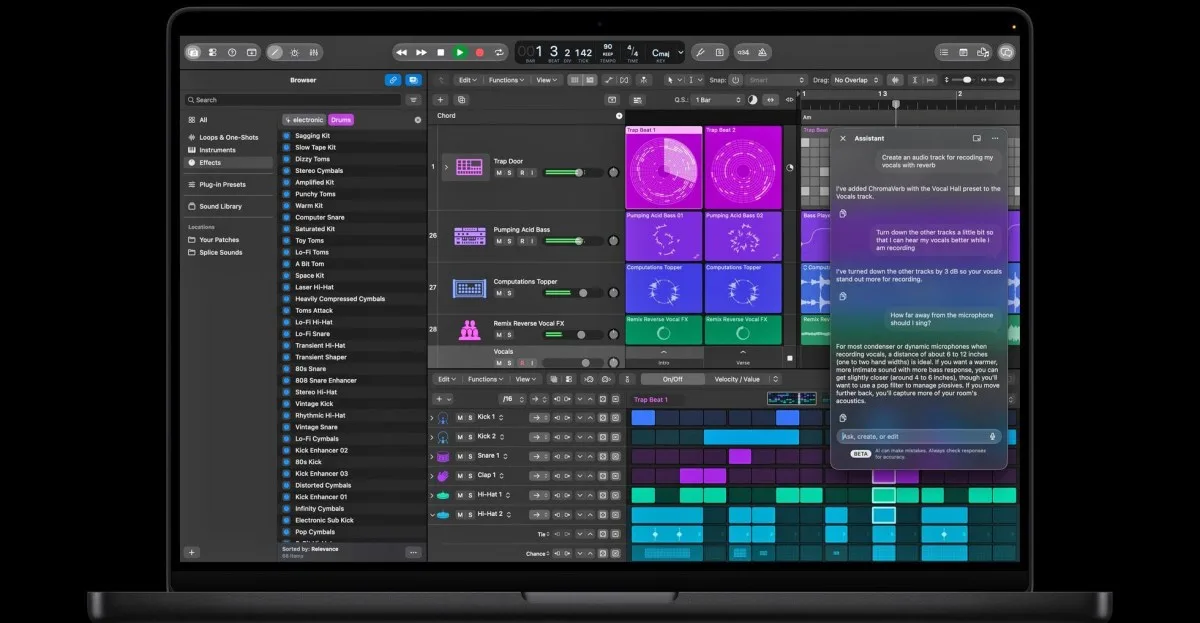
Apple Creator Studio subscribers in eight countries can now pay for more use of AI features after the monthly limit runs out. Unused extra usage carries over for up to 12 months, cannot be shared with family, and is not refundable. Apple's support page does not state a price.
Appleverified